A more expensive model is only better value if it does more useful work per dollar. Most production traffic doesn't need a frontier model, so paying frontier prices for it wastes budget.
Google's two newest Gemini 4 models make this trade-off sharp. Gemini 4 Carbon is built for deep, long-horizon reasoning. Gemini 4 Hydrogen is built for fast execution. From December 1, 2026, Carbon costs 2.67 times as much per token. (For the full rate card, see our Gemini 4 Hydrogen vs Carbon pricing guide.)
But token price is only half the picture. A cheap model that fails, loops or needs a human to fix its output can cost more than an expensive model that gets it right the first time. The real question is how much each model costs per task it actually completes.
This article compares Hydrogen and Carbon using Google's published benchmark results. It then shows, with clearly labeled scenarios, how to work out when Carbon's premium pays for itself.
Understanding the capabilities of Hydrogen
Gemini 4 Hydrogen is Google's fast, efficient model for everyday agentic work. Google calls it its "daily driver for agentic workflows", released on November 12, 2026.
Google highlights these strengths:
- Speed: It finishes tasks 2.5 times faster than Gemini 3.8 Flash at its default high thinking level.
- Intelligence for its class: It scores 51 on the Artificial Analysis Intelligence Index at the default level, one point above Gemini 4 Argon. At xhigh, it reaches 54.
- Reliability: Google reports more than 5 times fewer fabricated claims than Gemini 3.8 Flash.
- Context: It accepts 1 million input tokens and can return up to 1 million output tokens.
- Control: Developers can pick from four thinking levels, trading depth for speed and cost.
Google recommends Hydrogen for writing code, running tests and verifying changes. It also works as the execution engine alongside Carbon.
Understanding the capabilities of Carbon
Gemini 4 Carbon is Google's frontier model for the hardest problems. Google introduced it on October 28, 2026, and it became generally available on November 10.
Google highlights these strengths:
- Top-ranked intelligence: It scores 59 on the Artificial Analysis Intelligence Index v5.0, ranked first at launch.
- Complex engineering: It handles multi-package migrations, cross-subsystem root-cause analysis and architectural redesign.
- Knowledge work: It reads dense documents, charts and tables, and generates spreadsheets, presentations and reports.
- Security: It leads on vulnerability finding (SEC-bench Pro, 88.2%) and exploitation (ExploitGym, 54.8%).
- Fewer errors than Argon: Google reports about half as many unsupported claims in internal testing.
Google is open about the trade-off. Carbon uses more tokens than Argon to reason and verify its work. Google also says Argon remains the better choice for most software engineering and knowledge work. Carbon is for the tasks beyond that.
Coding and software development performance
Carbon leads on hard engineering tasks, while Hydrogen is Google's recommended model for routine coding work. Google hasn't published a head-to-head coding benchmark between the two, so the figures below compare each model with different reference points.
| Model | Published coding result | Source |
|---|---|---|
| Carbon | #1 on CursorBench 4.0 | https://blog.google/innovation-and-ai/models-and-research/gemini-models/gemini-4-carbon-now-available/ |
| Carbon | 1768 Elo on WebDev Arena, #4 | https://blog.google/innovation-and-ai/models-and-research/gemini-models/introducing-gemini-4-carbon/ |
| Carbon | More than 2x the secure code generation success rate of Argon (internal) | https://blog.google/innovation-and-ai/models-and-research/gemini-models/introducing-gemini-4-carbon/ |
| Hydrogen | 57% on Terminal-Bench 4.1, up from 18.2% for Gemini 3.8 Flash | https://blog.google/innovation-and-ai/models-and-research/gemini-models/introducing-gemini-4-hydrogen/ |
| Hydrogen | 2x to 2.8x faster than 3.8 Flash in partner testing | https://blog.google/innovation-and-ai/models-and-research/gemini-models/introducing-gemini-4-hydrogen/ |
Google's own guidance splits the work by type. Use Carbon for deep architectural judgment, such as designing systems or chasing subtle bugs. Use Hydrogen for writing code, running tests and verifying changes. For a typical team, that means Hydrogen handles most coding requests and Carbon handles the few that need deep reasoning.
Complex reasoning and problem-solving
On general reasoning, Carbon is clearly ahead. It scores 59 on the Artificial Analysis Intelligence Index, against 51 for Hydrogen at its default setting.
| Model and setting | Artificial Analysis Intelligence Index |
|---|---|
| Gemini 4 Carbon | 59 (v5.0, ranked #1) |
| Gemini 4 Hydrogen, high thinking | 54 |
| Gemini 4 Hydrogen, default (high) thinking | 51 |
| Gemini 4 Argon | 50 |
Scores as reported by Google in its Carbon and Hydrogen announcements. Google names v5.0 only for Carbon's score; check Artificial Analysis for current, like-for-like results.
Raising Hydrogen to xhigh closes part of the gap, from 8 points to 5. That's a useful middle option: more reasoning without switching models, at the cost of extra thinking tokens.
Hydrogen still holds its own on specialist tasks. Google reports it leads its class on HLE-Diamond (58.8%) and ranks first on the Vals Tax Agent Bench (52.3%). Carbon's lead shows most on open-ended, multi-step problems in science, maths and security research.
Agentic workflows and task execution
For agents, Google designed the two models to work together rather than compete. Carbon plans and coordinates; Hydrogen executes.
Google's clearest published evidence comes from the Orchestrator in Google Antigravity, which switches between Carbon and Hydrogen within one session. On Terminal-Bench 4.0, it reached near-Carbon task success while using 24% less quota and finishing 19% faster on average.
Each model also has its own agentic results:
- Carbon ranks first on Zapier's AutomationBench and Perplexity's WANDR. Google says it does this at more than 2x lower cost per task than the next-best external model.
- Hydrogen scores 71.6% on Agents' Last Exam v1.1 and ranks fifth on Agent Arena. Google also reports up to 81% less overreach and up to 79% less under-service in agentic tasks.
Note Google's own framing for Carbon: its comparison is cost per task, not cost per token. That's the right lens for agent workloads, and the next sections show how to apply it.
Performance versus token consumption
Carbon's real cost gap with Hydrogen is often wider than its per-token price suggests. Carbon spends more thinking tokens, and those are billed at the output rate.
| Rate (USD per million tokens) | Hydrogen | Carbon (from Dec 1, 2026) |
|---|---|---|
| Input | $1.50 | $4.00 |
| Output, including thinking | $7.50 | $20.00 |
Rates from Google's Hydrogen and Carbon announcements; Carbon costs $2 and $10 until November 30.
Google says Carbon uses more tokens than Argon to reason and verify. It hasn't published how many more. Hydrogen goes the other way: partners measured 12% to 23% fewer tokens than Gemini 3.8 Flash on the same work.
Three levers help control consumption on either model:
- Thinking level. Lower levels cut thinking tokens on simple requests. Save high and xhigh for tasks that need them.
- Caching. Repeated prompt prefixes are billed at a 95% discount, so keep static content at the start of each request.
- Shorter prompts. Fewer input tokens means a lower bill on every call. Tools like prompt compression do this automatically.
Measuring cost per successful task
The fairest way to compare Hydrogen and Carbon is cost per successful task: what you pay, including retries, for each task that's actually done.
\text{Cost per successful task} = \frac{\text{Cost per attempt}}{\text{Success rate}}The scenario below is illustrative, not a test result. We picked round token counts and success rates to show how the maths works. We assumed Carbon generates 40% more output tokens than Hydrogen, because Google says Carbon reasons longer. With those assumptions, one attempt costs $0.135 on Hydrogen and $0.424 on Carbon.
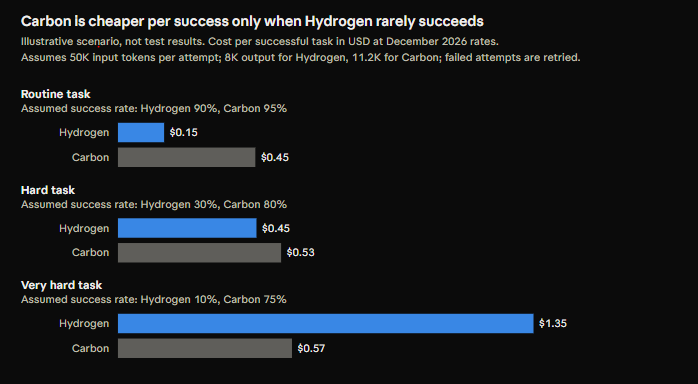
The break-even point follows from the ratio of those two costs. In this scenario, Carbon is cheaper per success only when Hydrogen's success rate is below about 32% of Carbon's. On routine tasks, Hydrogen wins easily. On very hard tasks, Carbon's higher first-time success outweighs its price.
The formula leaves out two costs that often favour Carbon: engineer time spent reviewing failed outputs, and the harm of a wrong answer that slips through. Add them if they apply to you.
To run this on your own workloads, you need three numbers per model: tokens per attempt, price per token and success rate. Opviera's per-model cost tracking records cost per request and ties it to a project and user, so you can work out cost per attempt from real traffic. See how Opviera works for the setup.
Choosing the right model for each workload
Default to Hydrogen, and escalate to Carbon only for the tasks where your own data shows it pays off. This table reflects Google's published positioning for each model.
| Workload | Recommended model | Why |
|---|---|---|
| Chat, support and classification | Hydrogen | High volume, low complexity; speed matters |
| Writing code, running tests, verifying changes | Hydrogen | Google's recommended use for Hydrogen |
| Agent worker and verifier steps | Hydrogen | Fast execution inside a larger workflow |
| Hard bugs that need a few extra reasoning steps | Hydrogen at xhigh | More reasoning without switching models |
| System design and architectural changes | Carbon | Deep, long-horizon reasoning |
| Multi-agent planning and coordination | Carbon | Google's Orchestrator gives Carbon this role |
| Security research and vulnerability analysis | Carbon | Leads SEC-bench Pro and ExploitGym |
You don't have to pick one model per team. Smart model routing sends each request to the lightest model that can handle it, so routine work stays cheap and hard work still gets the stronger model.
Frequently asked questions
Is Gemini 4 Carbon better than Hydrogen?
Carbon is the stronger reasoning model. It scores 59 on the Artificial Analysis Intelligence Index, against 51 for Hydrogen at its default setting. Hydrogen is faster and cheaper, and Google recommends it for most everyday coding and agentic work.
Is Gemini 4 Carbon worth the extra cost?
Only for tasks where it succeeds much more often than Hydrogen. In our illustrative scenario, Carbon becomes cheaper per successful task when Hydrogen's success rate falls below about a third of Carbon's.
Which Gemini 4 model is best for coding?
Google recommends Hydrogen for writing code, running tests and verifying changes. It recommends Carbon for deep architectural work, such as designing systems or resolving subtle bugs.
Does Gemini 4 Carbon use more tokens?
Yes. Google says Carbon uses more tokens than Argon to reason and verify its work. Those thinking tokens are billed at the output rate.
Can I use Hydrogen and Carbon together?
Yes. Google's Orchestrator in Antigravity switches between them, with Carbon planning and Hydrogen executing. Google reports near-Carbon results on Terminal-Bench 4.0 with 24% less quota use.
What is cost per successful task?
It's the cost per attempt divided by the success rate. It shows what you really pay for each completed task, including retries, so it's a fairer comparison than price per token.
Written by Chamod S.
Know what every AI task really costs
Token prices don't tell you which model gives you the best value. Opviera tracks AI spend per request, per model and per project, so you can see what each workload really costs and set budget limits before bills surprise you.
Discover how Opviera improves visibility into AI spending →
Keep reading
Gemini 4 Hydrogen vs Carbon Pricing: API Cost Comparison
Compare Gemini 4 Hydrogen and Carbon API pricing, see what Carbon's December 1 price increase means, and run cost simulations for real API workloads.
Read article → ComparisonAI Code Review Cost in CI/CD Pipelines
How much does automated AI code review cost? Explore per-PR pricing, CI/CD execution expenses, and practical ways to reduce AI code review spending.
Read article → ComparisonAI Cost Forecasting for Developer Teams
How much should your engineering team budget for AI? Explore AI cost forecasts for 10, 50, and 100 developers, with practical examples and spending controls.
Read article →